> For the complete documentation index, see [llms.txt](https://docs.perfectscale.io/llms.txt). Markdown versions of documentation pages are available by appending `.md` to page URLs; this page is available as [Markdown](https://docs.perfectscale.io/perfectscale-trial/perfectscale-trial/how-to-find-your-allocated-vcpu.md).
# How to find your allocated vCPU?
Learn how to retrieve the number of CPU Units per Kubernetes node to find your perfect license
To provide a more accurate cost metric and improve pricing transparency, the PerfectScale solution is licensed by the monthly vCPU consumption of your clusters.
{% hint style="info" %}
If your usage remains under 300 vCPU per month during your trial, you will be automatically converted to the free community package. Learn more about the Pricing model [here](https://www.perfectscale.io/pricing).
{% endhint %}
## Determine vCPU consumption
There are a few ways to determine your vCPU consumption:
[In the PerfectScale platform](#in-app)
[In your observability tool](#observability-tools)
### **In-app**
PerfectScale by DoiT has built a valuable feature that provides both the team and customers seamless access to subscription details, including visibility into normalized monthly vCPU consumption right within the platform.
To access your license details, go to **Subscription Details**, located under the account button at the bottom left of the screen.
Subscription details
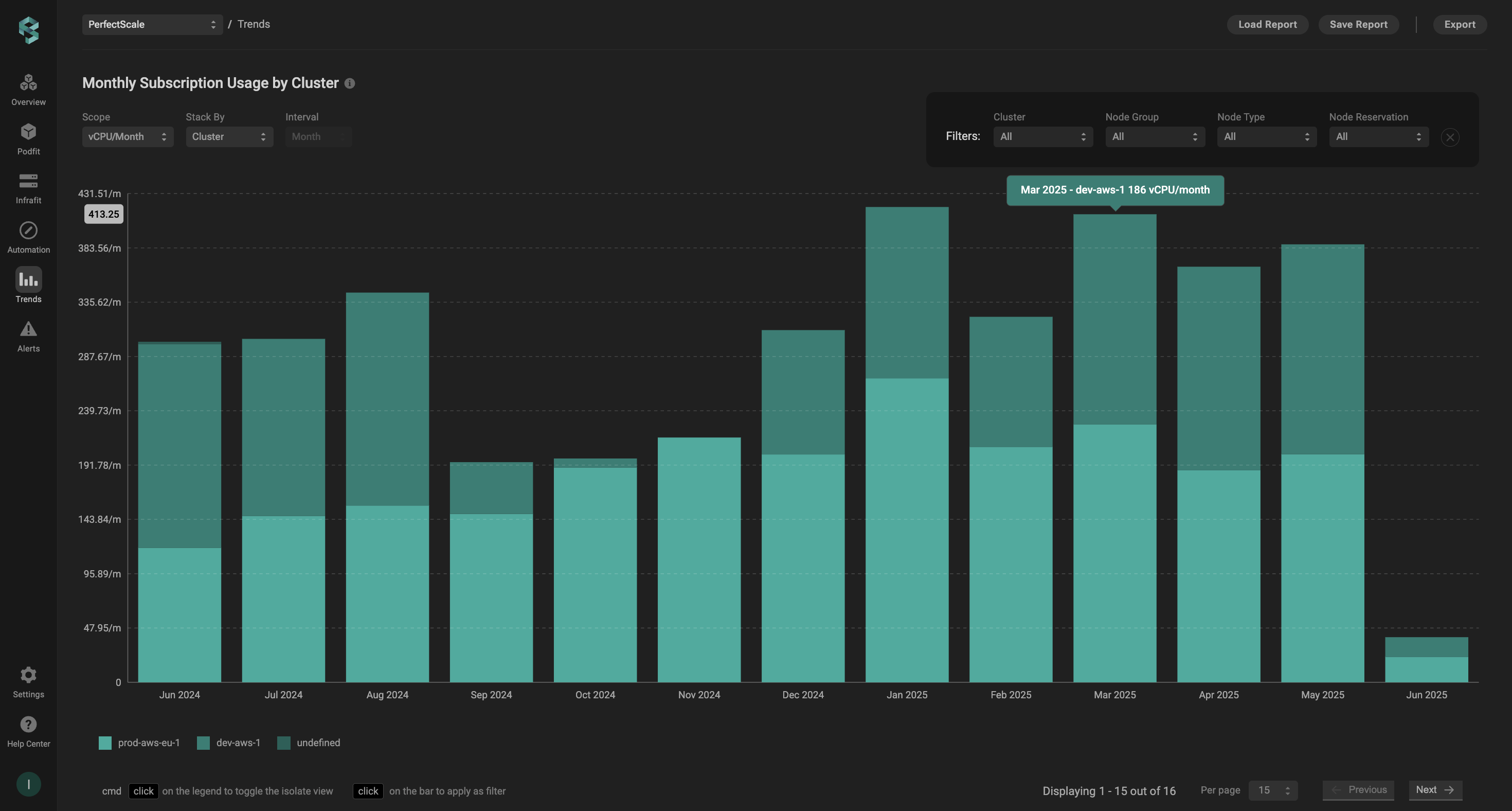
To view more details and track monthly vCPU consumption over time, simply click **View over-time vCPU consumption report** to access granular data in a trend report.
Monthly vCPU trend
### **Observability tools**
With your observability tool, like Grafana and DataDog you can either use some existing dashboard or create a new graph summarizing cluster capacity. \
\
For example, Prometheus can be used to create a visualization of cluster capacity, as shown below:
```promql
SUM(kube_node_status_capacity{resource="cpu", unit="core"})
```
vCPU/hours in the observability tool
In the above example, the allocated vCPU is around 90 cores. We can estimate monthly core hours as `90*24*30 = 64800`
Use the terminal following the guide below:
* Open a new terminal on the machine that has `kubectl` been installed. Make sure you are running in the correct context (=cluster)
* Type the following command on the prompt:
```yaml
kubectl get nodes -o custom-columns=NAME:'{.metadata.name}',CORES:'{.status.capacity.cpu}'
```
This will show you the currently running instances and their core capacity at a single point in time:
```
NAME CORES
ip-10-107-0-11.eu-central-1.compute.internal 2
ip-10-107-12-213.eu-central-1.compute.internal 2
ip-10-107-24-124.eu-central-1.compute.internal 8
ip-10-107-24-142.eu-central-1.compute.internal 2
ip-10-107-26-193.eu-central-1.compute.internal 2
ip-10-107-31-30.eu-central-1.compute.internal 8
ip-10-107-32-253.eu-central-1.compute.internal 4
ip-10-107-32-47.eu-central-1.compute.internal 4
ip-10-107-37-121.eu-central-1.compute.internal 2
ip-10-107-4-114.eu-central-1.compute.internal 2
ip-10-107-40-28.eu-central-1.compute.internal 4
ip-10-107-45-210.eu-central-1.compute.internal 2
ip-10-107-47-136.eu-central-1.compute.internal 2
ip-10-107-47-184.eu-central-1.compute.internal 4
ip-10-107-7-175.eu-central-1.compute.internal 4
ip-10-107-7-204.eu-central-1.compute.internal 2
```
* Now you can summarize the cores to have cluster cores ***`right now`***. You can multiply this number by 24\*30 to have a monthly estimate.
{% hint style="warning" %}
If your cluster has a dynamic nature, this approach may be less accurate than Observability tools or PerfectScale.
{% endhint %}
---
# Agent Instructions
This documentation is published with GitBook. GitBook is the documentation platform designed so that both humans and AI agents can read, navigate, and reason over technical content effectively. Learn more at gitbook.com.
## Querying This Documentation
If you need additional information that is not directly available in this page, you can query the documentation dynamically by asking a question.
Perform an HTTP GET request on the current page URL with the `ask` query parameter, and the optional `goal` query parameter:
```
GET https://docs.perfectscale.io/perfectscale-trial/perfectscale-trial/how-to-find-your-allocated-vcpu.md?ask=&goal=
```
`ask` is the immediate question: it should be specific, self-contained, and written in natural language.
`goal` is optional and describes the broader end goal you are ultimately trying to accomplish on behalf of the user. GitBook uses it to tailor the answer towards what is most useful for that goal.
The response will contain a direct answer to the question and relevant excerpts and sources from the documentation.
Use this mechanism when the answer is not explicitly present in the current page, you need clarification or additional context, or you want to retrieve related documentation sections.
.png?alt=media&token=f2ff00cc-edc0-4e6a-8ca8-3c5bd6f832b9)