> For the complete documentation index, see [llms.txt](https://docs.perfectscale.io/llms.txt). Markdown versions of documentation pages are available by appending `.md` to page URLs; this page is available as [Markdown](https://docs.perfectscale.io/2.0-self-hosted-or-perfectscale-documentation/visibility-and-optimization/infrafit-or-node-right-sizing/node-type-view.md).

# Node type view

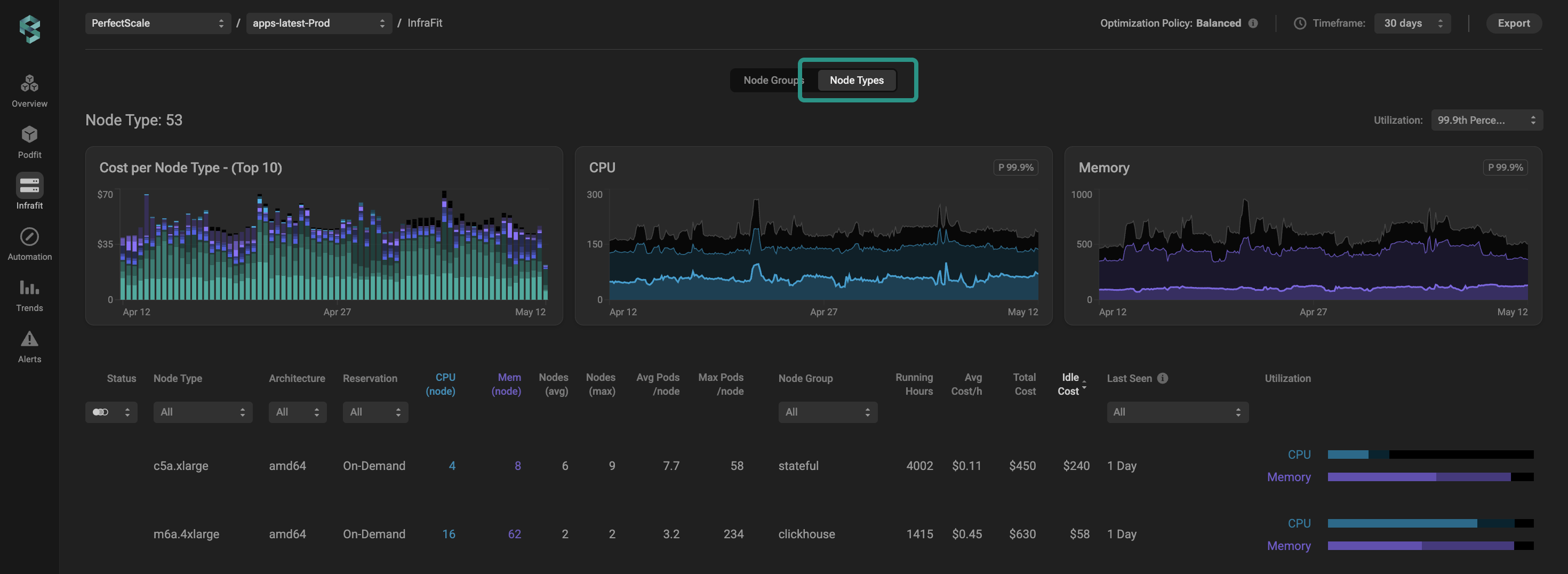
Identify wasted node resources and gain optimization insights to select the right nodes to better serve your environment's needs with the Node Types view.

<figure><img src="/files/JvrxznQanhFssknJW82j" alt=""><figcaption><p>Node type view</p></figcaption></figure>

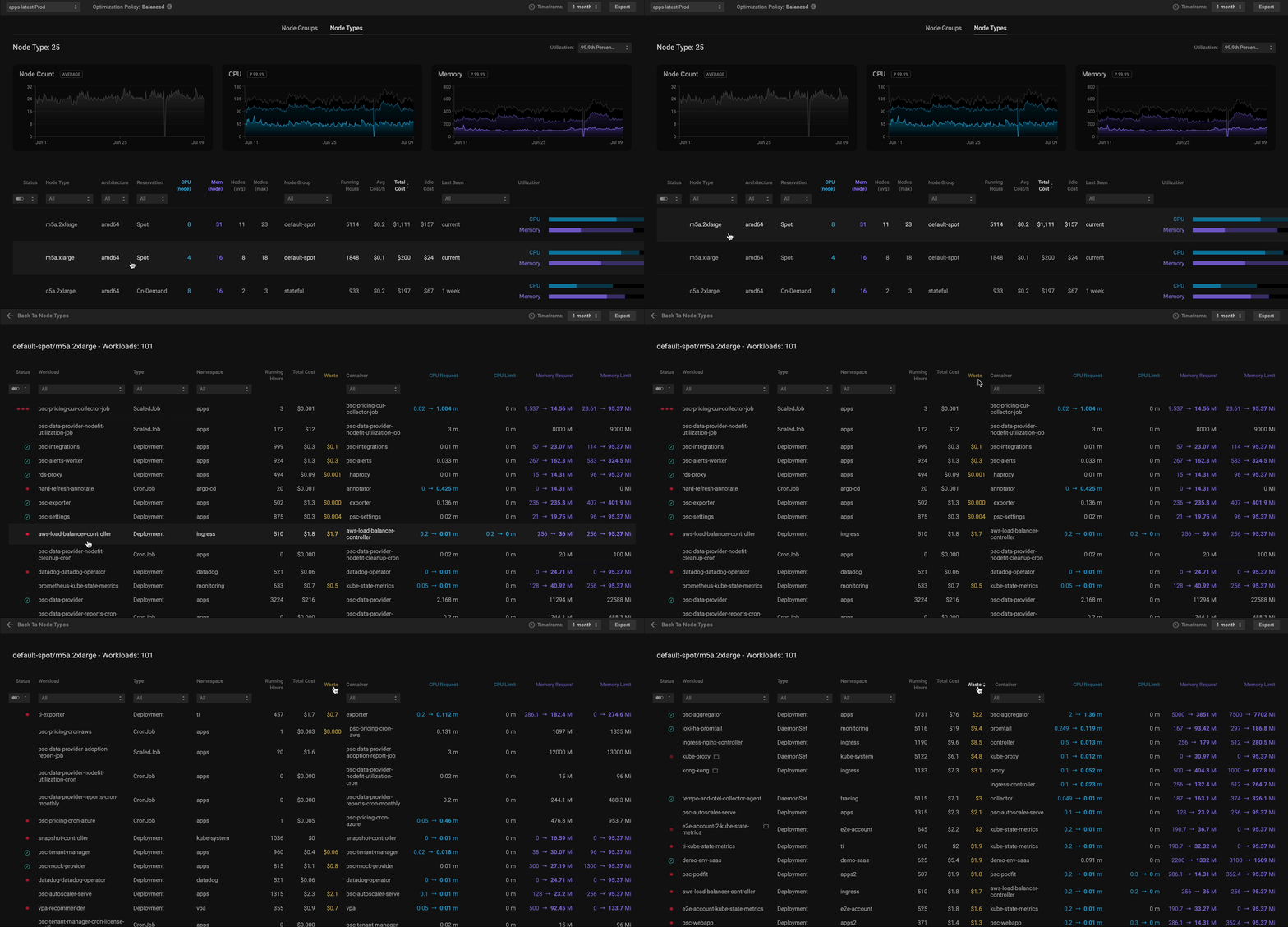
<table><thead><tr><th width="193.86328125">Column</th><th>Descripti</th></tr></thead><tbody><tr><td>Node Type</td><td>Displays the Instance Type Name. Click on a column title or use a drop-down list to sort or filter data.</td></tr><tr><td>Architecture</td><td>Displays the Node Architecture. Click on a column title or use a drop-down list to sort or filter data.</td></tr><tr><td>Reservation</td><td>Display the reservation type of nodes. Click on a column title or use a drop-down list to sort or filter data.</td></tr><tr><td>CPU/Mem (node)</td><td>Refers to the size of the instance type (memory and CPU).</td></tr><tr><td>Nodes (avg &#x26; max)</td><td>Displays the average and maximum number of nodes with the specific instance type. Click on a column title to sort data.</td></tr><tr><td>Avg Pods/node</td><td>Current average number of pods per the node in the node group.</td></tr><tr><td>Max Pods/node</td><td>The maximum possible pods that can be scheduled on the node.</td></tr><tr><td>Node Group</td><td>Displays which group nodes with a specific instance type belong to. Click on a column title or use a drop-down list to sort or filter data.</td></tr><tr><td>Running Hours</td><td>Displays the total instance running hours. </td></tr><tr><td>Avg Cost/h</td><td>Displays the average cost per hour of the instance with the specific type. Click on a column title to sort data.</td></tr><tr><td>Total Cost</td><td>Displays the total cost of nodes with the specific type. Click on a column title to sort data.</td></tr><tr><td>Idle Cost</td><td>Displays the cost of the space in nodes with the specific types that has never been used. Click on a column title to sort the data.</td></tr><tr><td>Last Seen</td><td>Displays the last time PerfectScale observed the node with the specific instance type.</td></tr><tr><td>Utilization</td><td><p></p><p>A visual representation of CPU and Memory Utilization (allocation, request, and usage) based on the selected usage percentile. Use a drop-down list to filter data with the needed value.</p><div data-gb-custom-block data-tag="hint" data-style="info" class="hint hint-info"><p>Clicking on a specific node type will navigate you to the workloads table, displaying the workloads associated with that node type. <br><img src="/files/MzrUat6pje36SnXiFydi" alt=""><br>This view is particularly helpful for identifying the most wasteful workload running on the node with the selected type and providing data-driven recommendations on how to eliminate it in a few clicks.<br>To explore the workload details at a deeper level, click on the specific workload to open a <a href="/pages/u8Ghmco03jG4PkZcwNYt#zoom-in-window">Zoom-in</a> window that provides an in-depth view.</p></div></td></tr></tbody></table>


---

# Agent Instructions
This documentation is published with GitBook. GitBook is the documentation platform designed so that both humans and AI agents can read, navigate, and reason over technical content effectively. Learn more at gitbook.com.

## Querying This Documentation
If you need additional information that is not directly available in this page, you can query the documentation dynamically by asking a question.

Perform an HTTP GET request on the current page URL with the `ask` query parameter, and the optional `goal` query parameter:

```
GET https://docs.perfectscale.io/2.0-self-hosted-or-perfectscale-documentation/visibility-and-optimization/infrafit-or-node-right-sizing/node-type-view.md?ask=<question>&goal=<endgoal>
```

`ask` is the immediate question: it should be specific, self-contained, and written in natural language.
`goal` is optional and describes the broader end goal you are ultimately trying to accomplish on behalf of the user. GitBook uses it to tailor the answer towards what is most useful for that goal.

The response will contain a direct answer to the question and relevant excerpts and sources from the documentation.

Use this mechanism when the answer is not explicitly present in the current page, you need clarification or additional context, or you want to retrieve related documentation sections.