# Custom Pricing configuration

PerfectScale **`Pricing profile`** feature allows you to customize how your cluster's price is calculated for more accurate data.  This can be especially helpful if you have special pricing conditions from your cloud provider.

{% hint style="info" %}
PerfectScale allows you to create unlimited **Custom Pricing** profiles, but only one can be applied to each cluster.
{% endhint %}

<figure><img src="https://3591580169-files.gitbook.io/~/files/v0/b/gitbook-x-prod.appspot.com/o/spaces%2FzCh9aABpk7yLeToPr6vk%2Fuploads%2FbzyPGmdfS1F49nMPzdxF%2Fimage.png?alt=media&#x26;token=2ea53fca-9725-48a8-9beb-fbcc28f96daf" alt=""><figcaption><p>Pricing profile</p></figcaption></figure>

## Configuring Custom pricing with the profile

### :tools: **How to create** Custom p**ricing profile**

There are two options for creating a Profile: [from the Settings tab](#from-the-settings-tab) or directly [from the Overview](#from-the-overview-tab).

#### From the **Settings** tab

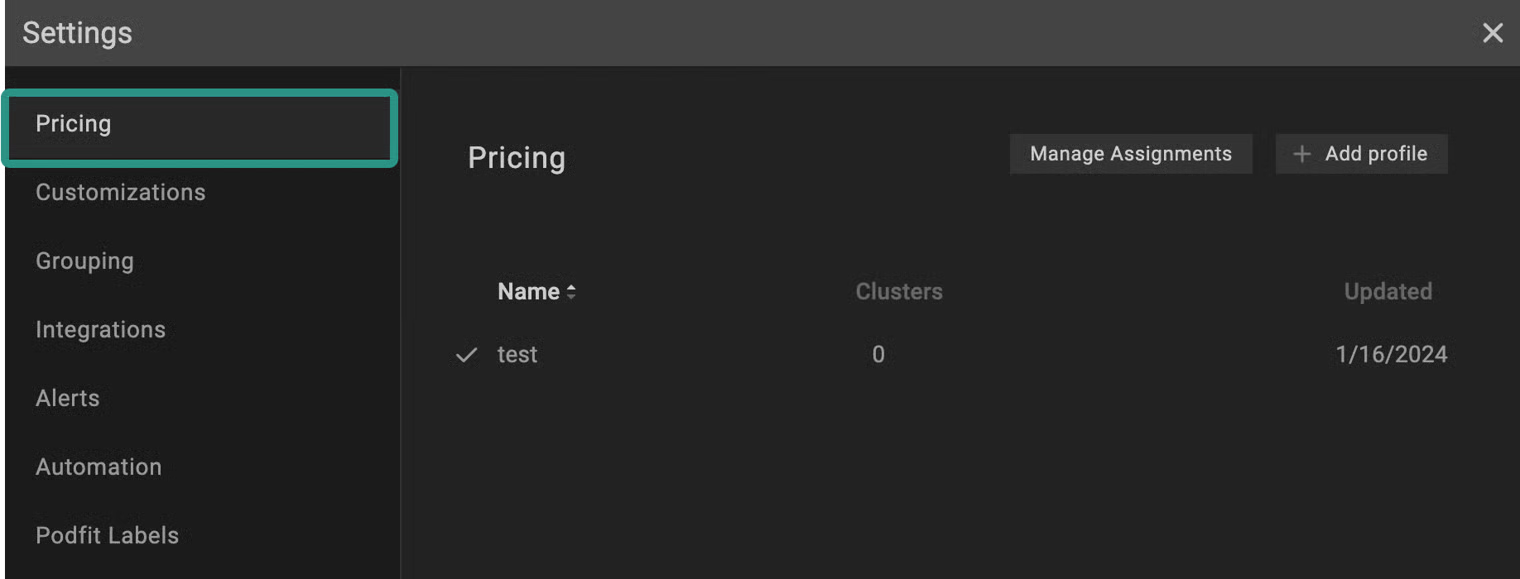
Go to the **`Settings`** tab on the left panel -> select **`Pricing`** -> click the **`+Add Profile`** button -> select **`Custom`** -> name the profile and put the needed values in the relevant fields -> click **`Save`** button.

<figure><img src="https://3591580169-files.gitbook.io/~/files/v0/b/gitbook-x-prod.appspot.com/o/spaces%2FzCh9aABpk7yLeToPr6vk%2Fuploads%2FgXvUT1Z4wURCuzMPNEAE%2F1.gif?alt=media&#x26;token=e4352142-c584-47a7-aeff-e8af1570af0e" alt=""><figcaption><p>Pricing profile from settings</p></figcaption></figure>

{% hint style="success" %}
Tick **`Set as default`** checkbox to apply the profile as a default to all the clusters that have no specific profile attached.
{% endhint %}

#### From the **Overview** tab

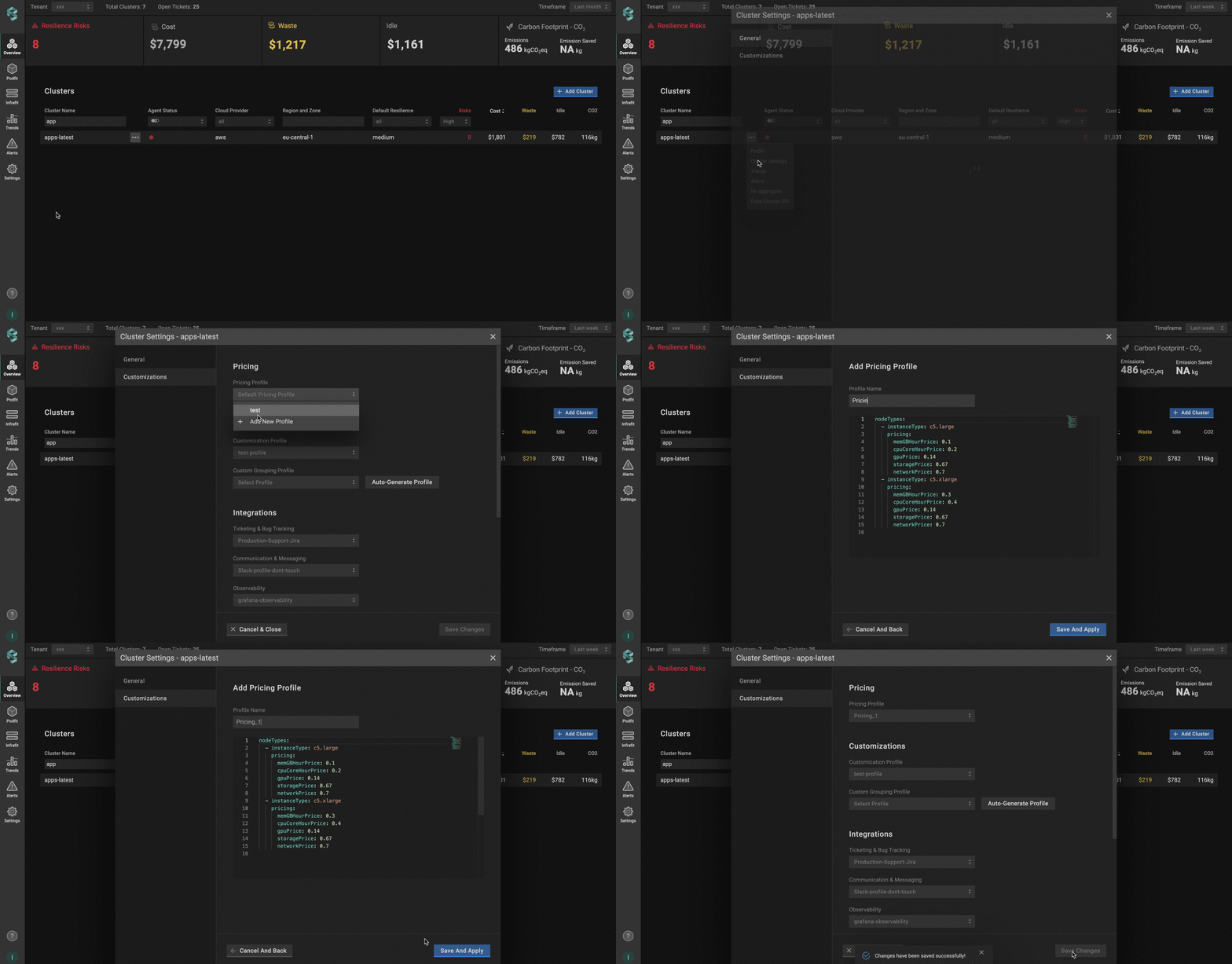
Go to the **`Overview`** tab on the left panel -> find the cluster to which you want to apply the custom **`Pricing Profile`** and click **`gear`** button -> go to **`Customizations`** -> click on **`Add New Profile`** in the **`Pricing Profile`** drop-down list -> name and configure your profile -> click the **`Save And Apply`** button -> click the **`Save Changes`** button.<br>

<figure><img src="https://3591580169-files.gitbook.io/~/files/v0/b/gitbook-x-prod.appspot.com/o/spaces%2FzCh9aABpk7yLeToPr6vk%2Fuploads%2FPjhf7O07mUO3oCVbNgOG%2F2.gif?alt=media&#x26;token=60fe7f2a-b63d-4f62-b9fe-93f988c2fa0b" alt=""><figcaption><p>Pricing profile from overview</p></figcaption></figure>

#### Custom pricing profile configuration

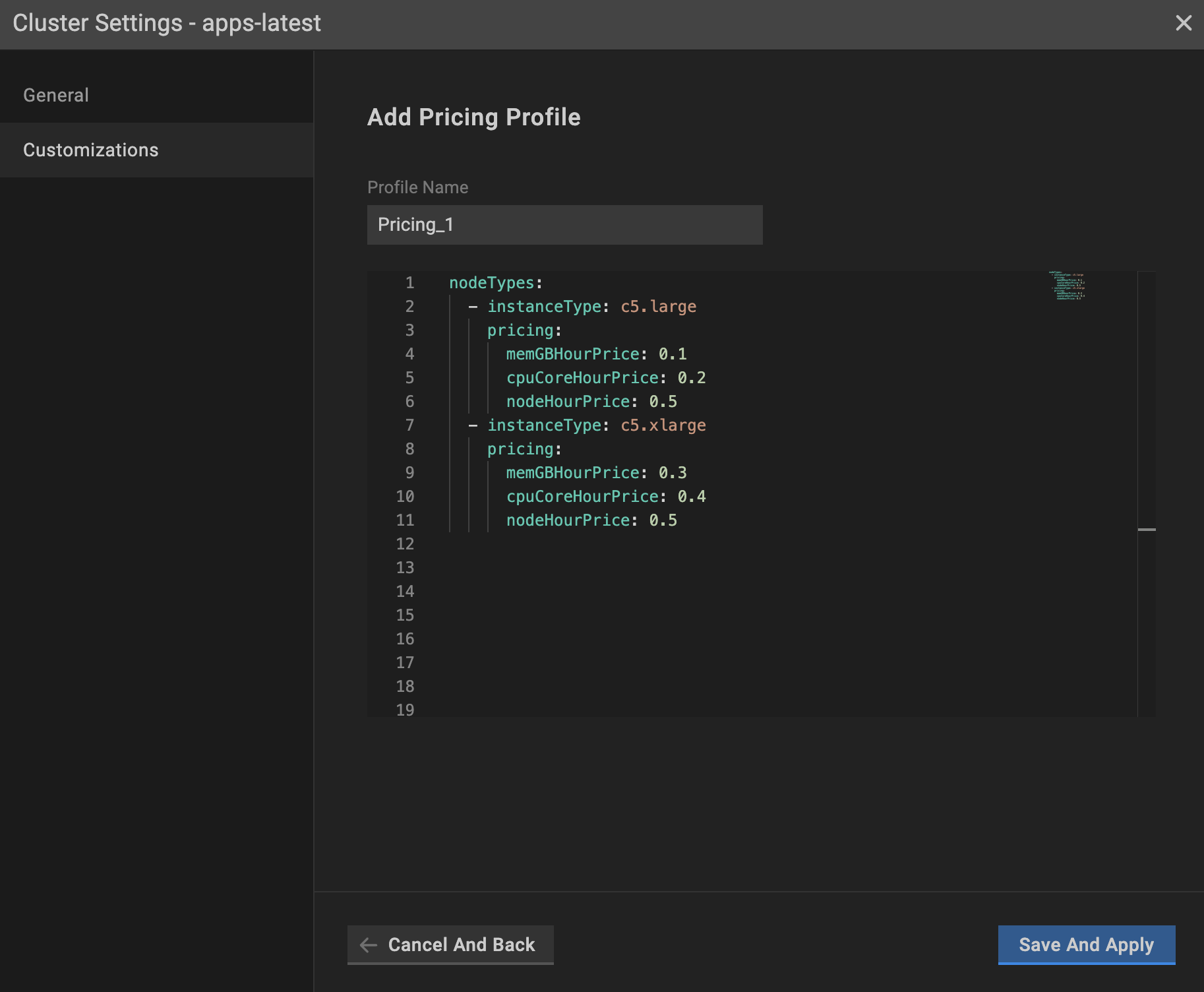
<figure><img src="https://content.gitbook.com/content/zCh9aABpk7yLeToPr6vk/blobs/QIL2J9TNQFU5yrB8pOfL/image.png" alt="" width="563"><figcaption><p>Pricing profile configuration</p></figcaption></figure>

`global_discount` (optional block):

* `percentage` - the percentage (0–100, floats supported) of the discount to apply on top of standard on-demand node pricing. This field is required when  `global_discount` exists.
* `start_date` (optional) - the effective start date for applying the `global_discount`. If this field is empty, it defaults to today.

{% hint style="info" %}
If you change the `percentage` or `start_date`, only newly generated [Trends report](https://docs.perfectscale.io/2.0-self-hosted-or-perfectscale-documentation/visibility-and-optimization/trends-monitoring) will reflect the update. Historical reports will not update automatically. Contact <support@perfectscale.io> if you need them recalculated.
{% endhint %}

`instanceType` - the name of the instance that is given by the provider.

`memGBHourPrice` - the price ($) of 1 GB of memory per hour.

`cpuCoreHourPrice` - the price ($) of 1 core per hour.

`nodeHourPrice` - the price ($) of a node per hour.

{% hint style="success" %}
To incorporate a new instance, duplicate the element and input appropriate values.
{% endhint %}

PerfectScale provides two options for specifying custom pricing in the profile:

* Specify the cost of the resources (`memGBHourPrice` and `cpuCoreHourPrice`)
* Specify the cost of the node (`nodeHourPrice`)

{% hint style="info" %}
`nodeHourPrice`**takes precedence over** `memGBHourPrice` and `cpuCoreHourPrice`.   If all the values are specified in the PricingProfile, PerfectScale will take `nodeHourPrice` into account only.
{% endhint %}

### :tools: **How to apply** Custom p**ricing profile**

#### Apply to a single cluster

To apply **`Pricing Profile`** to the cluster, go to the **`Overview`** tab on the left panel -> find the cluster to which you want to apply the custom **`Pricing Profile`** and click **`gear`** button -> go to **`Customizations`** -> select the needed profile in the **`Pricing Profile`** drop-down list.&#x20;

<figure><img src="https://3591580169-files.gitbook.io/~/files/v0/b/gitbook-x-prod.appspot.com/o/spaces%2FzCh9aABpk7yLeToPr6vk%2Fuploads%2FLRptn1m7QjbU0ZXwc8Kr%2F3.gif?alt=media&#x26;token=8c5723a0-520e-4768-a4f4-3bf174ef0563" alt=""><figcaption><p>Applying pricing profile to a single cluster</p></figcaption></figure>

#### Apply to multiple clusters

To apply the profile to **multiple clusters** from a single view, use the **`Manage Assignments`** feature.&#x20;

Go to the **`Settings`** tab on the left panel -> select the **`Pricing`** -> click the **`Manage Assignments`** button -> apply the profiles for the needed clusters -> click the **`Save Changes`** button.

<figure><img src="https://3591580169-files.gitbook.io/~/files/v0/b/gitbook-x-prod.appspot.com/o/spaces%2FzCh9aABpk7yLeToPr6vk%2Fuploads%2FlXNz10R4cJrCw0RGjTDl%2F4.gif?alt=media&#x26;token=46d997c6-f8eb-4123-80df-13a7c6543af3" alt=""><figcaption><p>Applying pricing profile to multiple clusters</p></figcaption></figure>

{% hint style="info" %}
You can easily manage your profiles (create, delete), but deleting such profiles is impossible if the profile is already connected to the cluster. Change the profile to default or any other, and only after that, remove the current one.
{% endhint %}

## Configuring Custom pricing with the CRD

To configure Custom pricing using a Custom Resource Definition (CRD), you’ll need to define and apply a Custom Resource (CR) that specifies your unique billing conditions. This approach allows you to manage pricing for specific instances directly through Kubernetes manifests.&#x20;

{% hint style="warning" %}
The Custom Resource (CR) must be created in the `perfectscale` namespace.
{% endhint %}

Here is an example of the CR configuration:

```yaml
apiVersion: perfectscale.io/v1
kind: ClusterSettings
metadata:
  name: cluster-settings-main
  namespace: perfectscale
spec:
  profiles:
    pricing:
      # Create and assign a custom pricing profile inline
      - type: custom
        name: my-custom-pricing
        assigned: true
        value:
          global_discount:
            percentage: 5
            start_date: 2025-31-12
          nodeTypes:
            - instanceType: c5.large
              pricing:
                cpuCoreHourPrice: 0.085
                memGBHourPrice: 0.0095
                nodeHourPrice: 0.0
            - instanceType: c5.xlarge
              pricing:
                cpuCoreHourPrice: 0.085
                memGBHourPrice: 0.0095
                nodeHourPrice: 0.0
            - instanceType: m5.large
              pricing:
                cpuCoreHourPrice: 0.096
                memGBHourPrice: 0.0096
                nodeHourPrice: 0.0
            - instanceType: m5.xlarge
              pricing:
                cpuCoreHourPrice: 0.096
                memGBHourPrice: 0.0096
                nodeHourPrice: 0.0
```

#### ⚙️ **CR parameters:**

<table><thead><tr><th width="251.94921875">Parameter</th><th>Description</th></tr></thead><tbody><tr><td><strong><code>global_discount</code></strong> (optional block)</td><td>The discount to apply on top of standard on-demand node pricing.<br><code>percentage</code> - the percentage (0–100, floats supported) of the discount. This field is required when  global_discount exists.<br><code>start_date</code> (optional) - the effective start date for applying the global_discount.</td></tr><tr><td><strong><code>instanceType</code></strong></td><td>The instance name assigned by the provider.<br><strong>Example</strong>: <code>m5.large</code>, <code>m5.xlarge</code>, etc.</td></tr><tr><td><strong><code>cpuCoreHourPrice</code></strong></td><td>The hourly cost ($) for each GB of memory.</td></tr><tr><td><strong><code>memGBHourPrice</code></strong></td><td>The hourly cost ($) for 1 CPU core.</td></tr><tr><td><strong><code>nodeHourPrice</code></strong></td><td>The hourly cost ($) of a node.</td></tr></tbody></table>

{% hint style="warning" %}
If a `global_discount` percentage is provided without a `start_date` in the CRD profile, we won’t default to today’s date as we do for profiles configured in the UI, and the discount will not be applied. The pricing profile appears broken in the UI.
{% endhint %}