# Label customizations

PerfectScale can recognize some labels automatically. However, it can be set up manually for advanced label configuration. This is particularly helpful when you are using custom labels to organize your K8s resources.

You can customize your labels for the workloads as well as for nodes. Currently, the following options are available:

<table><thead><tr><th width="218.052734375">Label</th><th>Description</th></tr></thead><tbody><tr><td><strong>workload_labels</strong></td><td>Defines labels that can be applied to Kubernetes resources (pods, deployments, or stateful sets) to identify and manage workloads within a cluster.</td></tr><tr><td><strong>spot_labels</strong></td><td>Identifies spot nodes.</td></tr><tr><td><strong>node_group_labels</strong></td><td>Identifies the nodes group in a cluster.</td></tr><tr><td><strong>architecture_labels</strong></td><td>Specifies the architecture of the node (x86_64, arm64, etc.)</td></tr><tr><td><strong>os_labels</strong></td><td>Specifies the operating system running on a node within the Kubernetes cluster.</td></tr><tr><td><strong>instance_type_labels</strong></td><td>Specifies the type or configuration of VMs (instances) within a cloud infrastructure.</td></tr><tr><td><strong>region_labels</strong></td><td>Specifies the geographical region where a particular resource is located.</td></tr><tr><td><strong>availability_zone_labels</strong></td><td>Specify the availability zone where a particular resource is located.</td></tr><tr><td><strong>ignored_pod_labels</strong></td><td>Defines labels that Kubernetes components should disregard when making pod decisions.</td></tr><tr><td><strong>ignored_node_labels</strong></td><td>Defines labels that Kubernetes components should disregard when making node decisions.</td></tr></tbody></table>

## Label Formatting

Kube-state-metrics exposes labels following Prometheus conventions:

1. Add the `label_` prefix to the label
2. Replace non-alphabetic characters with underscores
3. Convert camel case to snake case by using underscores to separate words

{% hint style="info" %}
**Example**

kubernetes.azure.com/scalesetpriority: spot -> label\_kubernetes\_azure\_com\_scalesetpriority: spot

```
node:
  spot_labels:
    label_kubernetes_azure_com_scalesetpriority: spot
```

{% endhint %}

## Configuring Custom Labels with the profile

### :tools: **How to create** **Customization Profile**

There are two options for creating a Profile: [from the Settings tab](#from-the-settings-tab) or directly [from the Overview](#from-the-overview-tab).

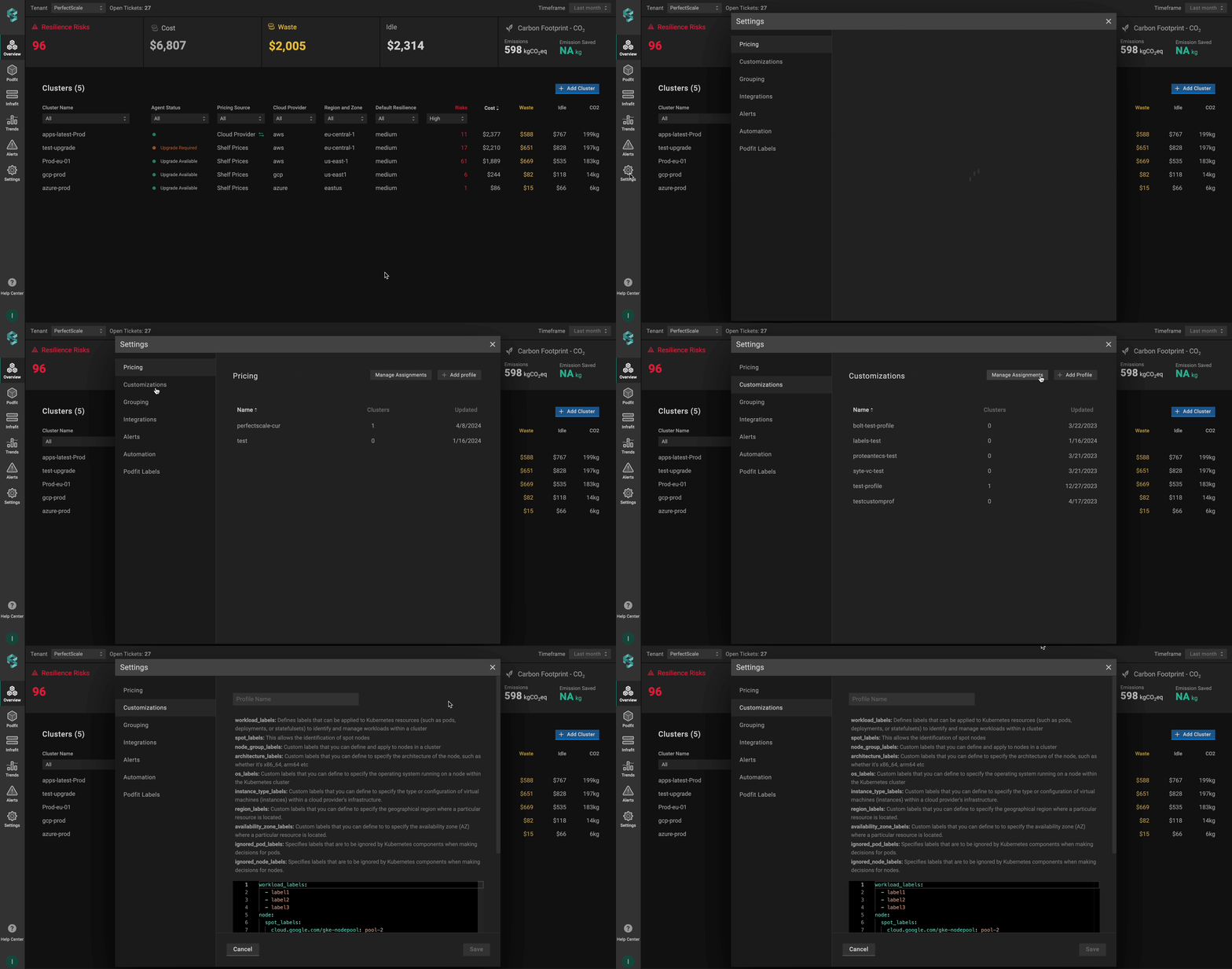
#### From the **Settings** tab

Go to the **`Settings`** tab on the left panel -> select **`Customizations`** -> click the **`+Add Profile`** button -> name and configure the profile -> click **`Save`** button.

<figure><img src="https://content.gitbook.com/content/zCh9aABpk7yLeToPr6vk/blobs/i8wYLbXPkHWH57JnyUQQ/custom_settings.gif" alt=""><figcaption><p>Customization profile from settings</p></figcaption></figure>

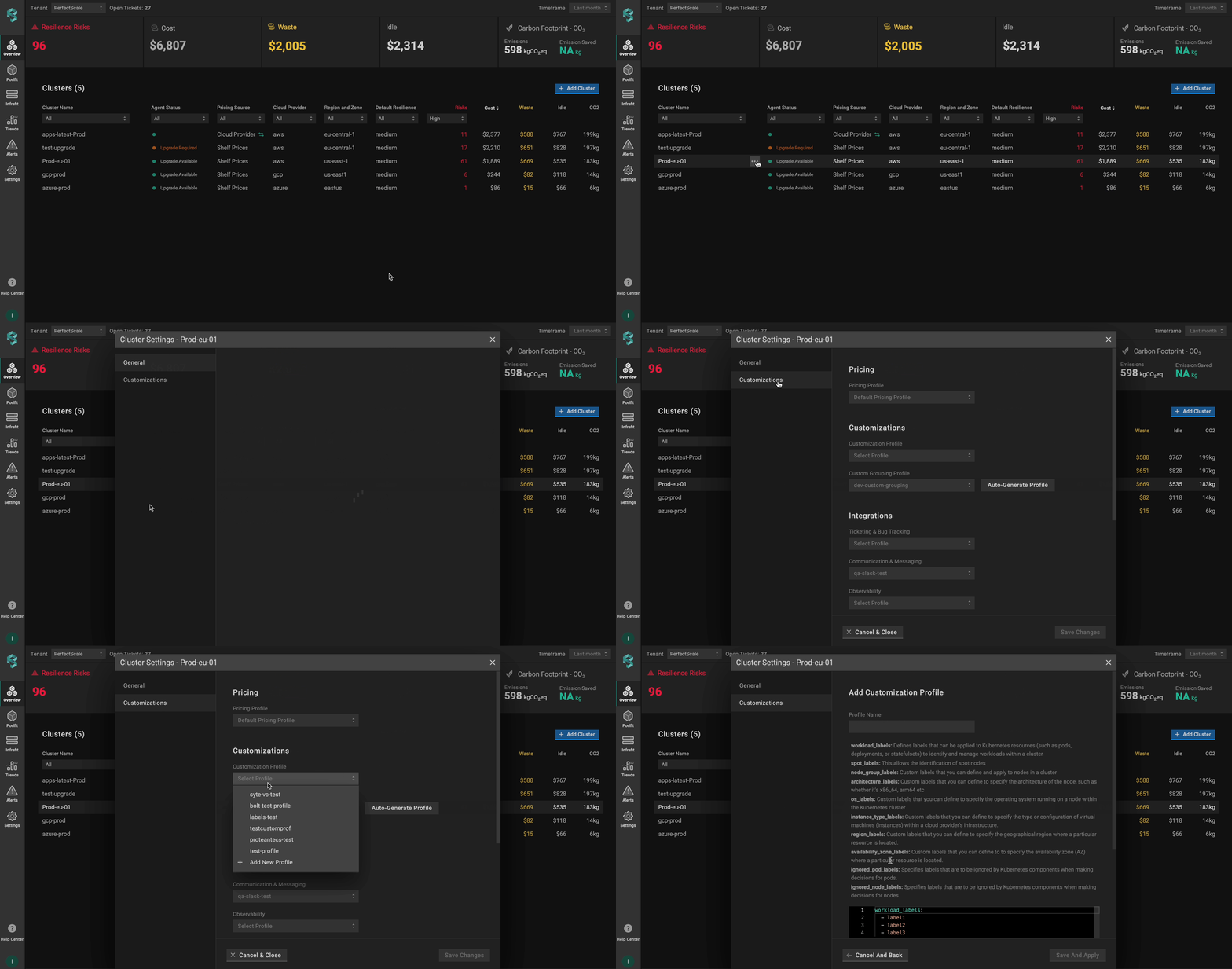
#### From the **Overview** tab

Go to the **`Overview`** tab on the left panel -> find the cluster to which you want to apply the **`Customization Profile`** and click **`gear`** button -> go to **`Customizations`** -> click on **`Add New Profile`** in the **`Customization Profile`** drop-down list -> name and configure your profile -> click the **`Save And Apply`** button -> click the **`Save Changes`** button.

<figure><img src="https://content.gitbook.com/content/zCh9aABpk7yLeToPr6vk/blobs/I2lHXnynAuCBS0pktirw/custom_overview.gif" alt=""><figcaption><p>Customization profile from overview</p></figcaption></figure>

{% hint style="info" %}
Use **`Set as default`** checkbox to automatically assign the profile to the clusters.\
\
:bulb: **NOTE**: The manually assigned profile takes priority over the default one.
{% endhint %}

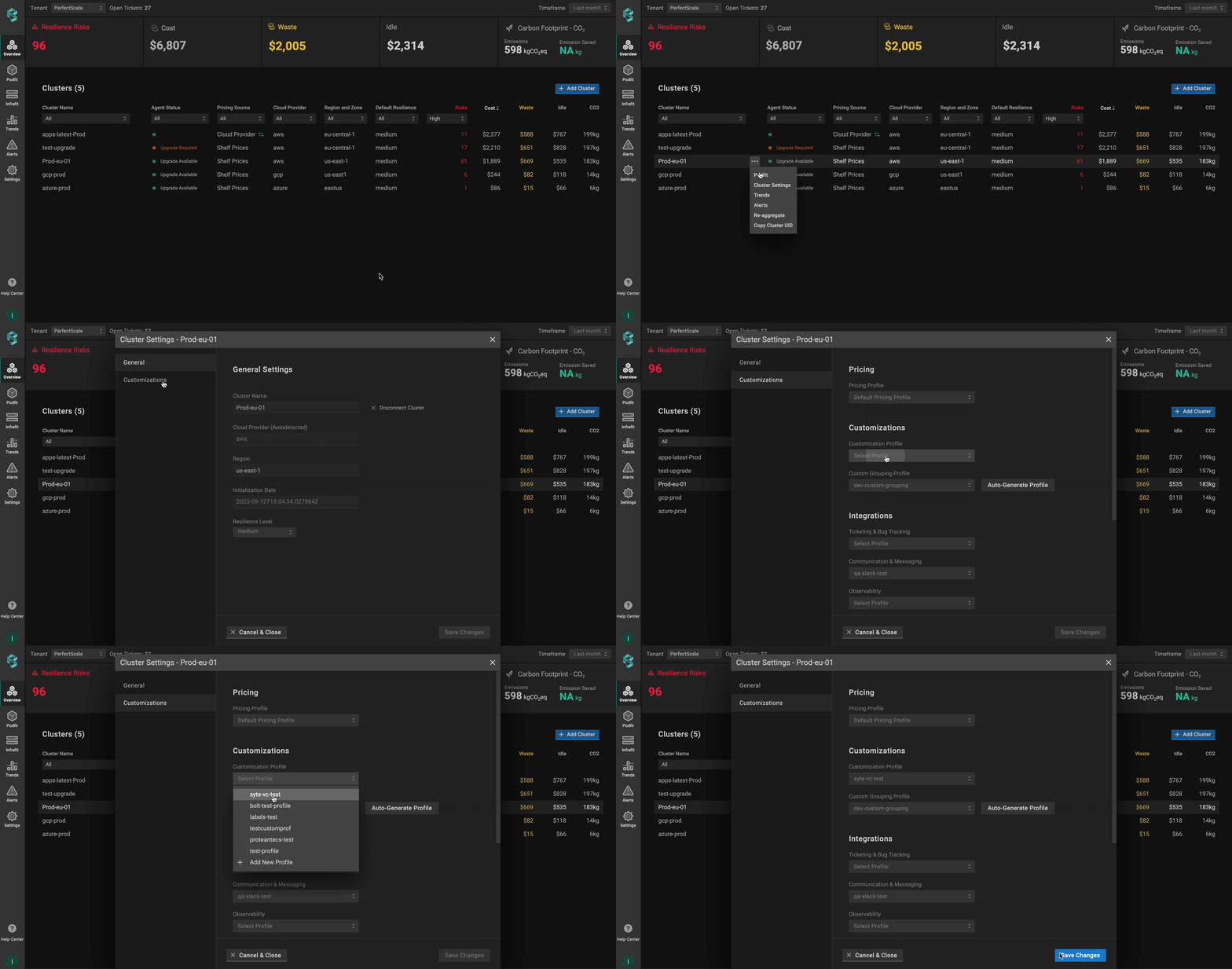
### :tools: **How to apply** Customization **Profile**

#### Apply to a single cluster

To apply **`Customization Profile`** to the cluster, go to the **`Overview`** tab on the left panel -> find the cluster to which you want to apply the **`Customization Profile`** and click **`gear`** button -> go to **`Customizations`** -> select the needed profile in the **`Customization Profile`** drop-down list.&#x20;

<figure><img src="https://content.gitbook.com/content/zCh9aABpk7yLeToPr6vk/blobs/feJwxeXd0ohMuNT7XKxJ/custom_single.gif" alt=""><figcaption><p>Applying customization profile to a single cluster</p></figcaption></figure>

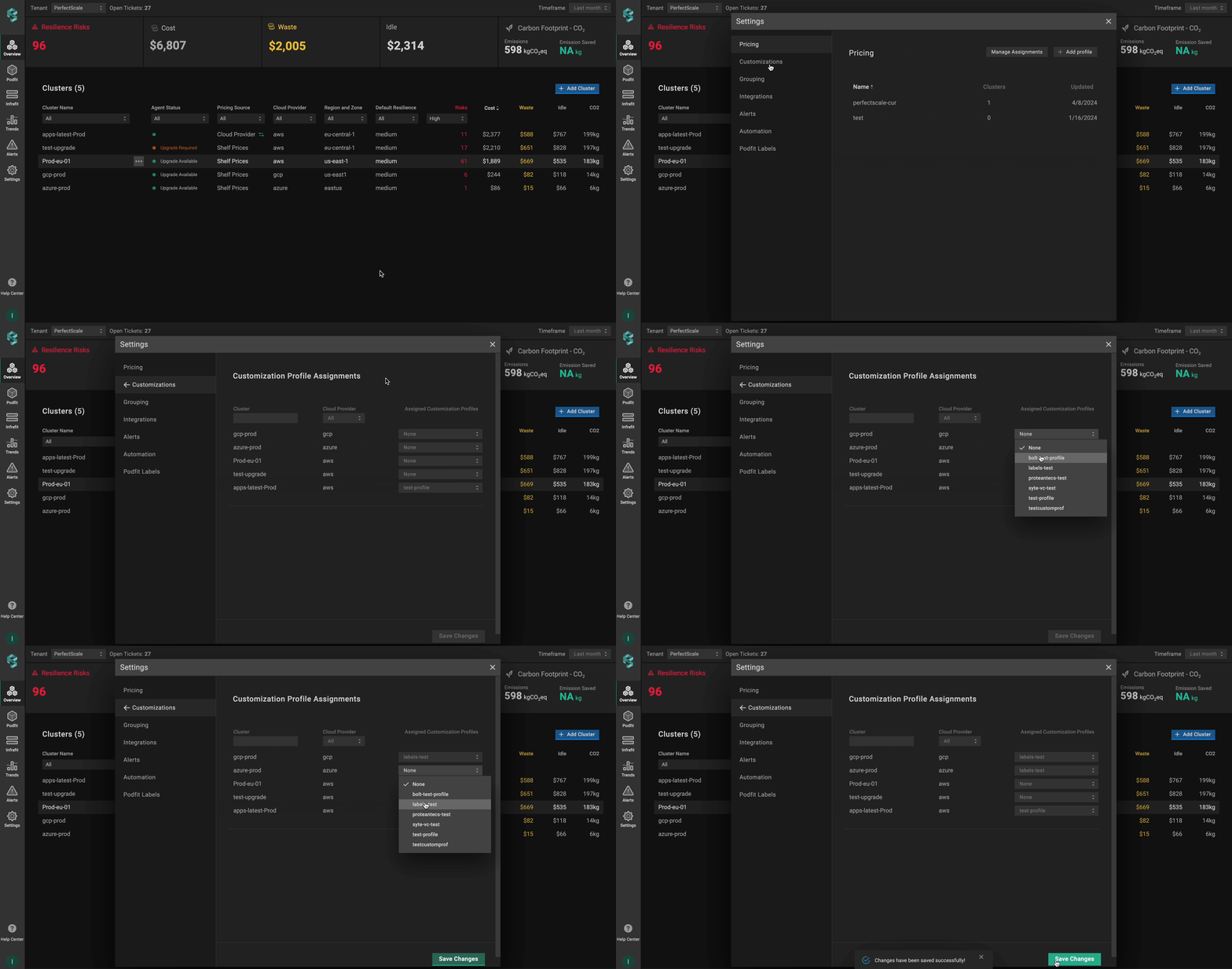
#### Apply to multiple clusters

To apply the profile to **multiple clusters** from a single view, use the **`Manage Assignments`** feature.&#x20;

Go to the **`Settings`** tab on the left panel -> select the **`Customizations`** -> click the **`Manage Assignments`** button -> apply the profiles for the needed clusters -> click the **`Save Changes`** button.

<figure><img src="https://content.gitbook.com/content/zCh9aABpk7yLeToPr6vk/blobs/quqeYBde3NRoMi0mauZD/custom_multip.gif" alt=""><figcaption><p>Applying customization profile to multiple clusters</p></figcaption></figure>

## Configuring Custom Labels with CRD

To enable custom labels and node identification using a Custom Resource Definition (CRD), you’ll need to define and apply a Custom Resource (CR) with the required parameters. This approach allows you to manage Custom Labels directly through Kubernetes manifests.&#x20;

{% hint style="warning" %}
The Custom Resource (CR) must be created in the `perfectscale` namespace.
{% endhint %}

### Setup instructions

1. Identify the labels used in your Kubernetes cluster to distinguish workloads.
2. Identify the labels used for node properties such as spot instances, node groups, architecture, etc.
3. Configure the fields below to match your cluster’s label structure.
4. Configure the CR.

{% hint style="info" %}
Ensure labels follow Prometheus conventions. Learn more about the format [here](https://prometheus.io/docs/concepts/data_model/#metric-names-and-labels).
{% endhint %}

```yaml
apiVersion: perfectscale.io/v1
kind: ClusterSettings
metadata:
  name: cluster-settings-main
  namespace: perfectscale
spec:
  profiles:
    customization:
      - name: custom-workload-labels
        assigned: true
        value:
          workload_labels:
            - io.codefresh.pipelineName
            - app.kubernetes.io/name
            - app.kubernetes.io/component
            - app.kubernetes.io/version
            - app.kubernetes.io/part-of
          node:
            spot_labels:
              label_cloud_google_com_gke_nodepool: pool-2
              label_spotinst_io_node_lifecycle: spot
            node_group_labels:
              - eks.amazonaws.com/nodegroup
              - kops.k8s.io/instancegroup
            architecture_labels:
              - kubernetes.io/arch
              - beta.kubernetes.io/arch
            os_labels:
              - kubernetes.io/os
              - beta.kubernetes.io/os
            instance_type_labels:
              - node.kubernetes.io/instance-type
              - beta.kubernetes.io/instance-type
            region_labels:
              - topology.kubernetes.io/region
              - failure-domain.beta.kubernetes.io/region
            availability_zone_labels:
              - topology.kubernetes.io/zone
              - failure-domain.beta.kubernetes.io/zone
          ignored_pod_labels:
            - uid
            - namespace
            - pod
          ignored_node_labels:
            - uid
```

⚙️ **CR parameters:**

| Parameter                      | Description                                                                                                                                         |
| ------------------------------ | --------------------------------------------------------------------------------------------------------------------------------------------------- |
| **`workload_labels`**          | Defines labels that can be applied to Kubernetes resources (pods, deployments, or stateful sets) to identify and manage workloads within a cluster. |
| **`spot_labels`**              | Identifies spot nodes (key-value pairs).                                                                                                            |
| **`node_group_labels`**        | Identifies the node groups in a cluster.                                                                                                            |
| **`architecture_labels`**      | Specifies the architecture of the node (x86\_64, arm64, etc.).                                                                                      |
| **`os_labels`**                | Specifies the operating system running on a node within the Kubernetes cluster.                                                                     |
| **`instance_type_labels`**     | Specifies the type or configuration of VMs (instances) within a cloud infrastructure                                                                |
| **`region_labels`**            | Specifies the geographical region where a particular resource is located.                                                                           |
| **`availability_zone_labels`** | Specifies the availability zone where a particular resource is located.                                                                             |
| **`ignored_pod_labels`**       | Defines labels that Kubernetes components should disregard when making pod decisions.                                                               |
| **`ignored_node_labels`**      | Defines labels that Kubernetes components should disregard when making node decisions.                                                              |