> For the complete documentation index, see [llms.txt](https://docs.perfectscale.io/llms.txt). Markdown versions of documentation pages are available by appending `.md` to page URLs; this page is available as [Markdown](https://docs.perfectscale.io/2.0-self-hosted-or-perfectscale-documentation/administration/subscription-details.md).

# Subscription details

A detailed overview of your PerfectScale license, including the current Plan, start and expiration dates, and vCPU consumption

Subscription details enable easy management of your PerfectScale subscription, helping you track consumption metrics and maintain visibility of your license status.

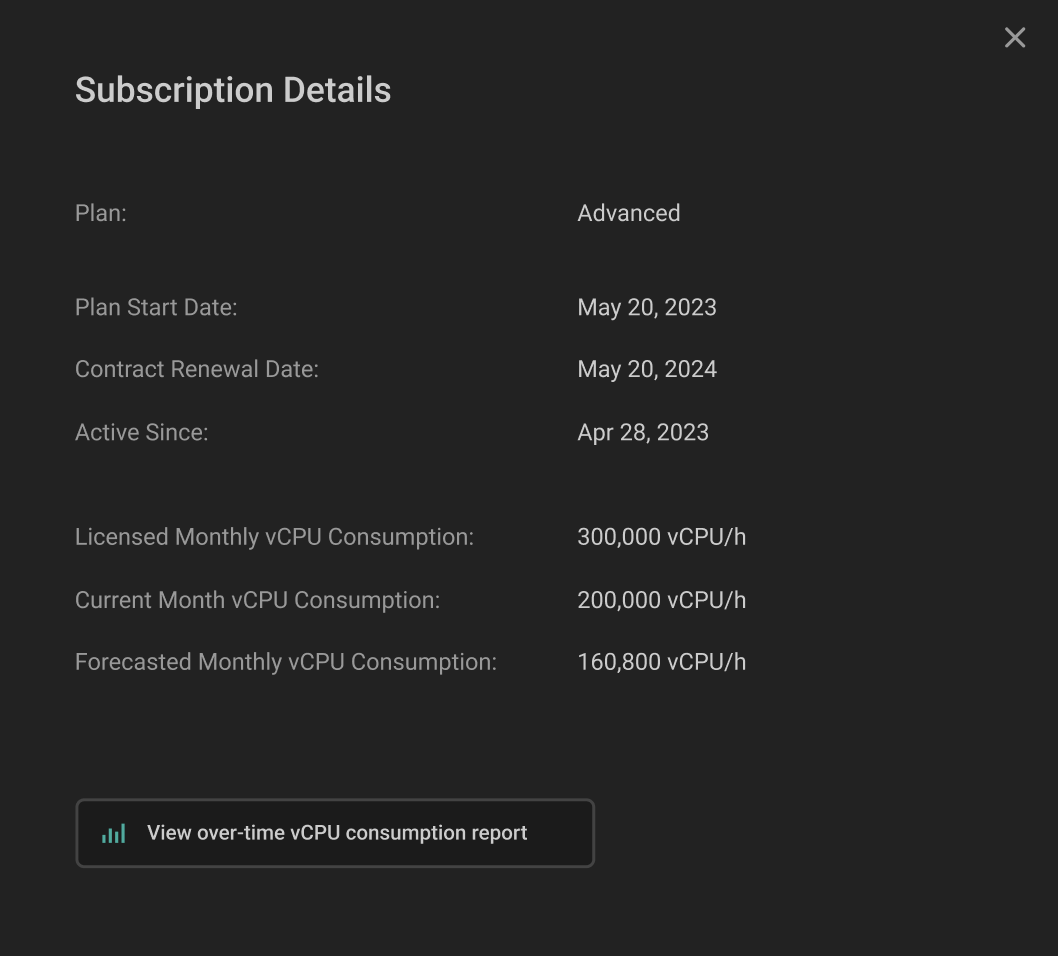
Click the **`Account button`** in the bottom left corner, then go to the **`Subscription Details`** to review your license details.

<figure><img src="https://content.gitbook.com/content/zCh9aABpk7yLeToPr6vk/blobs/hwYAjnGE9Hzgq64bNS6N/image.png" alt="" width="321"><figcaption><p>Navigation</p></figcaption></figure>

## Subscription Details window

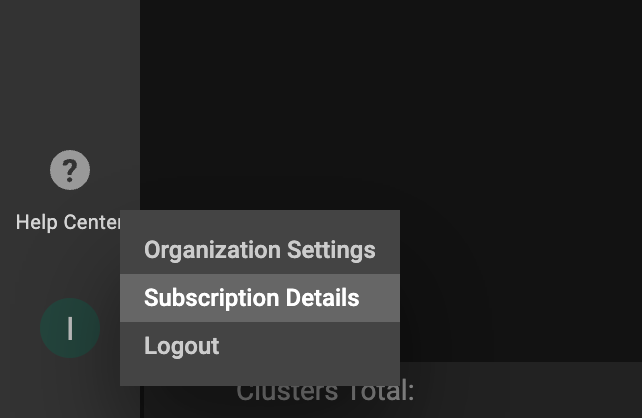
<figure><img src="https://content.gitbook.com/content/zCh9aABpk7yLeToPr6vk/blobs/DEsuzD09rKGPrVzd6ubG/image.png" alt="" width="563"><figcaption><p>Subscription details window</p></figcaption></figure>

<table><thead><tr><th width="236">Field</th><th>Description</th></tr></thead><tbody><tr><td><strong>Plan</strong></td><td>Current subscription plan (Trial, Community, Advanced or Expert)</td></tr><tr><td><strong>Plan Start Date</strong></td><td>The date of license activation</td></tr><tr><td><strong>Contract Renewal Date</strong></td><td>Current license expiration date</td></tr><tr><td><strong>Active Since</strong></td><td>Account creation date</td></tr><tr><td><strong>Licensed Monthly vCPU Consumption</strong></td><td>The available monthly vCPU consumption under the license</td></tr><tr><td><strong>Current Month vCPU Consumption</strong></td><td>The current monthly vCPU consumption calculation</td></tr><tr><td><strong>Forecasted Monthly vCPU Consumption</strong></td><td>The forecasted monthly vCPU consumption calculation</td></tr></tbody></table>

For a comprehensive view of your vCPU consumption over time, clicking the **`View over-time vCPU consumption report`** button will directly navigate you to the report, where you can slice and dice the data with various filters.&#x20;